Getting Started with Linux: A Practical Introduction
LinuxShellDevOps
Linux powers most of the internet: servers, containers, Android phones, and a growing number of developer laptops. If you write software, knowing your way around it pays off quickly.
What is Linux?
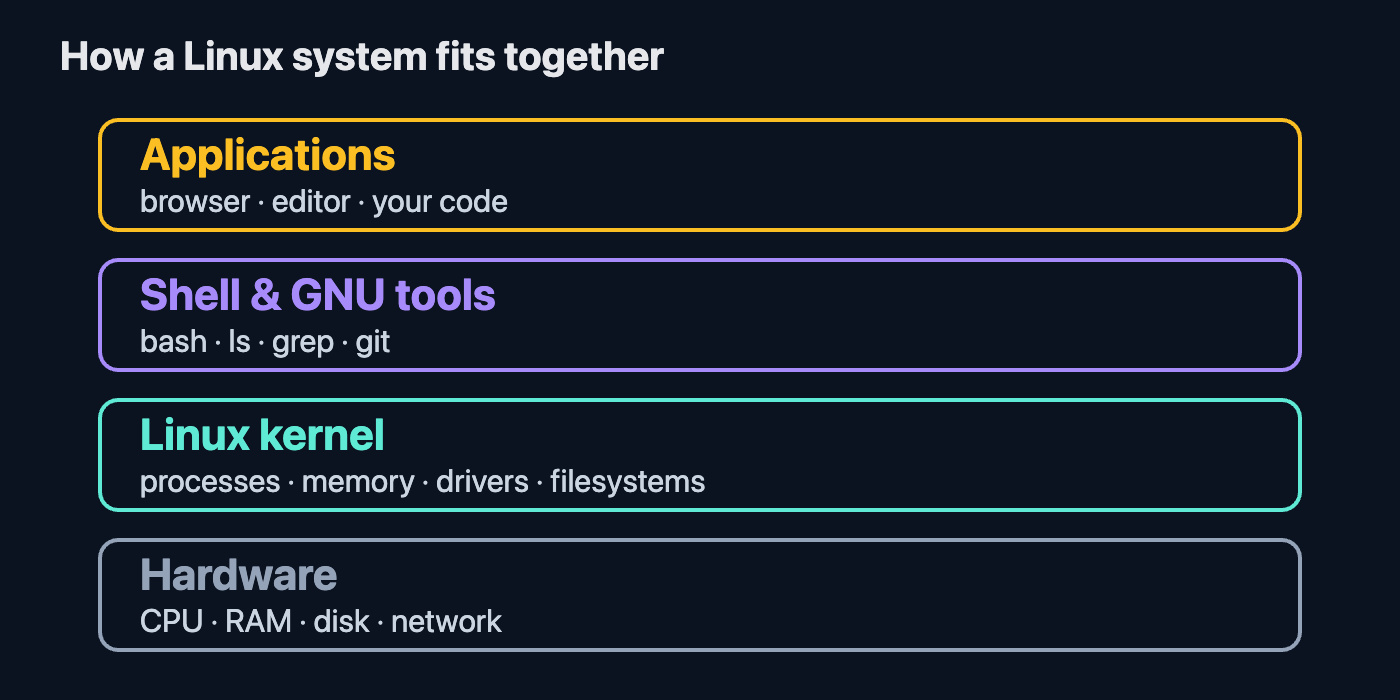
Linux is an open-source operating system kernel created by Linus Torvalds in 1991. Combined with GNU tools and a package manager, it becomes a distribution such as Ubuntu, Fedora, Debian, or Arch.
Why developers like it
- Open and hackable: you can inspect and change almost everything.
- Great tooling: compilers, editors, and shells are first-class citizens.
- Dominant in production: most servers and containers run Linux, so your dev environment matches deployment.
Essential commands
pwd                 # where am I?
ls -la              # list files, including hidden ones
cd ~/projects       # change directory
mkdir notes         # create a folder
cp a.txt b.txt      # copy a file
mv b.txt c.txt      # move or rename
rm c.txt            # delete a file
cat a.txt           # print a file
grep -r "TODO" .    # search text recursively
Permissions in one minute
Every file has read (r), write (w), and execute (x) bits for the owner, group, and others. Use chmod +x script.sh to make a script runnable and chown to change ownership.
Installing software
sudo apt update && sudo apt install git     # Debian/Ubuntu
sudo dnf install git                        # Fedora
Next steps
Pick a distribution, install it in a VM or dual-boot, and try doing your daily work from the terminal. Learn ssh, systemd, and shell scripting next. The best way to learn Linux is to use it every day.